



WI-FI TRAINING
Designing 5 GHz Wi-Fi Networks
Designing 5 GHz Wi-Fi Networks
We’re going to compare and contrast the 2.4 GHz and 5 GHz bands. By understanding the tradeoffs that each Wi-Fi band has to offer, you’re going to be able to ensure the best deployment for your site. Let’s dive right in with an overview of the two wireless bands!
The 2.4 GHz band is packed. The most common wireless access points around are 802.11b/g/n, and are spread out across 11 channels in the US, of which only three don’t overlap. These non-overlapping channels are (say it with me now!) 1, 6, and 11. You also know about the different types of congestion (adjacent and co-channel) that can occur in the 2.4GHz band. Non-Wi-Fi interference is also a very common cause of interference in the 2.4 GHz range, and often requires spectrum analysis to diagnose and correct.
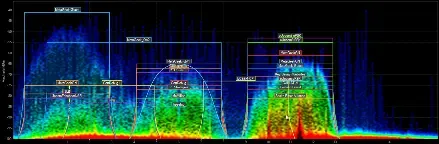
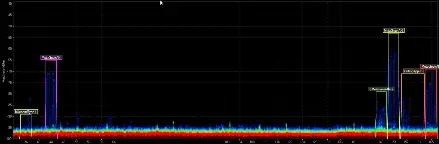
The 5 GHz band, on the other hand, is relatively empty when compared to the 2.4 GHz band. Here you’ll find 802.11a/n/ac capable devices will not encounter adjacent channel interference. Since the available 5 GHz channels don’t overlap, you won’t have to worry about adjacent channel interference, and there are so many channels available that it shouldn’t be difficult to choose one.
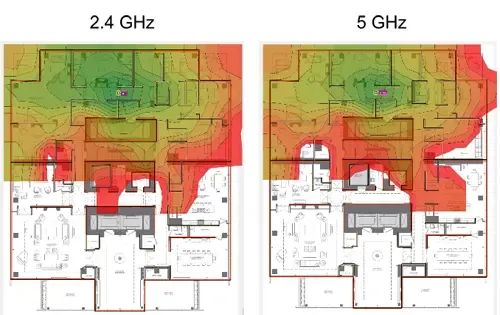
The image below shows coverage comparisons between the 2.4 GHz and 5 GHz bands as seen in Ekahau Site Survey’s virtual designer. The darkest green in both simulations represents a speed of 150 Mbps, but the darkest reds are what’s different. The red in the 2.4 GHz simulation represents a speed of 1 Mbps, while the 5 GHz’s red represents a speed of 6 Mbps. As you can see, the 2.4 GHz AP does have slightly more coverage, but the speed at the edges of the 5 GHz coverage are faster.
Below are the channel diagrams for these two planned deployments. In the 2.4 GHz deployment, Channels 1, 6, and 11 are reused and spread apart. The 5 GHz deployment is able to use nine different channels without difficulty.

Hopefully you now have a good foundation of the differences between the 2.4 GHz and 5 GHz bands. You’ve seen real examples of what activity looks like as seen in Oscium’s Chanalyzer spectrum analysis software, as well as simulated coverage maps that compare the two. By using dual band access points for your wireless deployments, you’ll be able to double your potential wireless bandwidth, lower the impact of interference, and enjoy an all-around better Wi-Fi network.
Enter your email to subscribe to our newsletter and receive updates.

At Oscium, we've spent over 16 years turning complex technology into tools that
work better for everyone.


©2026 OSCIUM. All Rights Reserved.