



Tonic is the Cure!
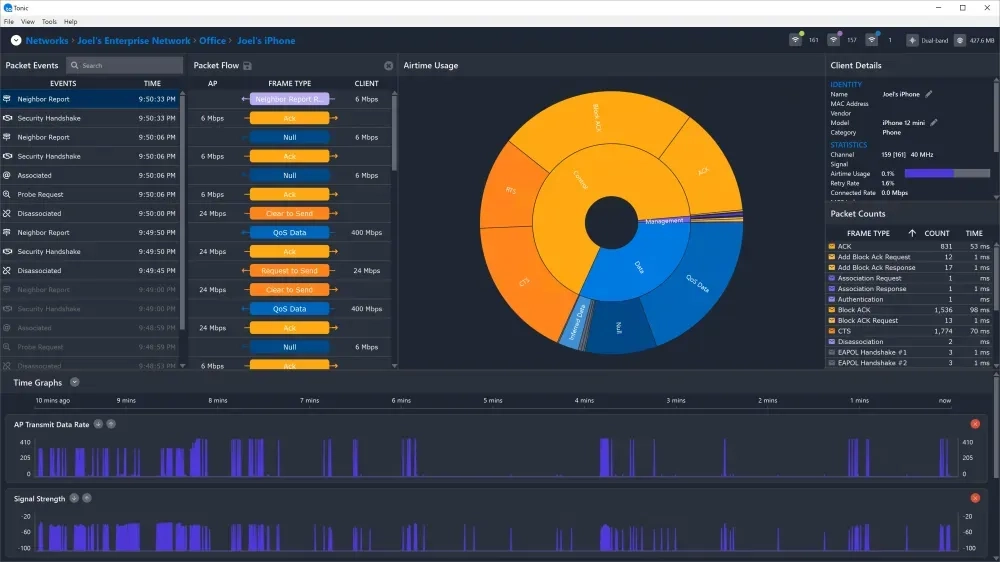
Today we are excited to announce Tonic, a brand-new Wi-Fi analysis application that blends the best of Chanalyzer, Eye P.A. and inSSIDer into a single tool for fast comprehensive analysis of any Wi-Fi network.
While Eye P.A. is amazing, it focuses on post-capture analysis. Many customers have told us about their frustrations with existing Wi-Fi packet capture tools - frustrations that cost time and money, such as:
 Capturing involves multiple manual steps
- Almost zero instrumentation during the capture
- No idea what frames you captured
- You have to scroll massive lists of packets to find events
- Packet exchanges are hard to filter down to and read
- Process is too complicated for a junior tech on site
- Capturing roaming events is a nightmare
The primary design goal of Tonic was to create a "what you see is what you get" packet capture that made it easy and obvious to the user that the desired event was captured, and then be able to export a small pcap file for deeper analysis in other tools like Eye P.A., Wireshark, or OmniPeek.
Tonic performs real-time packet analysis, leveraging beautiful visualizations to remove mental obstacles and promote understanding of technical issues, so the user can resolve network problems. It focuses on real-time 802.11 frame analysis, and can use a Wi-Spy DBx for spectrum analysis to give the user a complete look at their wireless landscape.
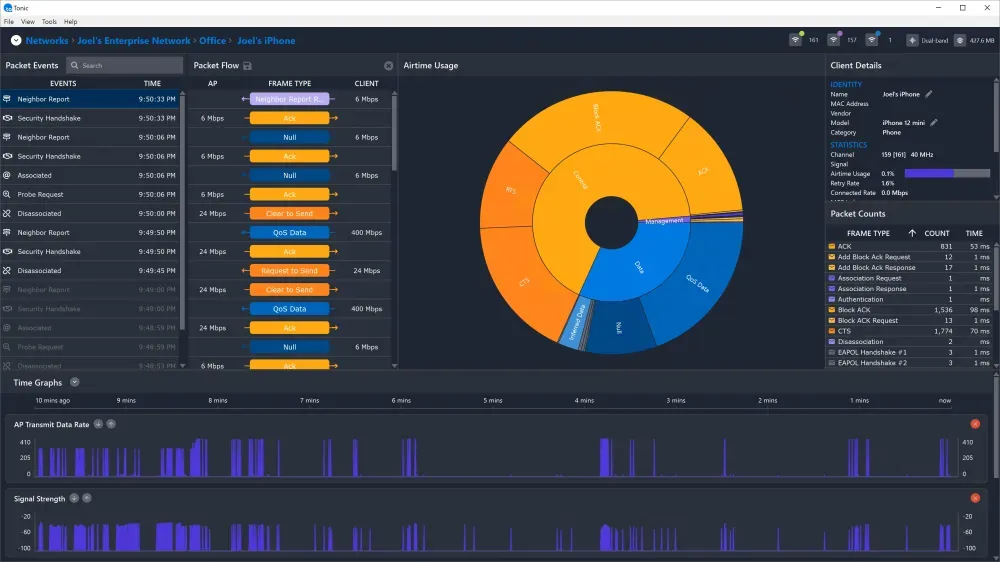
Tonic is:
- WYSIWYG Packet Capture
- Automatic Adapter Channel Management
- Packet Event Detection
- Packet Flow Visualization
- Contextual Packet Decode
“I spend hours trying to capture data, not knowing if I’ve captured it.”
Current packet capture tools require the user to manually select a channel, and give virtually no feedback on what is being captured. Tonic naturally guides the user to the correct channel, AP, or client, and shows the engineer live packet analytics as packets are captured, giving them complete confidence that they’ve captured the issue and relevant data.
“I have to look frame by frame to find the needle in the haystack.”
Current packet analysis tools do little if anything to identify events. Instead of forcing the user to scroll through thousands of packets, Tonic will automatically identify and chronologically locate packet events. Once the engineer sees that an event has occurred, the capture can effortlessly be exported to Eye P.A., which shows shortcuts to events on a similar timeline for instant navigation.
Tonic is part of MetaGeek Enterprise Suite, a subscription that includes Eye P.A. and Chanalyzer, allowing the applications to work together as a seamless suite of tools.
Enter your email to subscribe to our newsletter and receive updates.

At Oscium, we've spent over 16 years turning complex technology into tools that
work better for everyone.


©2026 OSCIUM. All Rights Reserved.